Saturday, 12 October 2013

C++ course (fifth section 1)

C++ course(fifth section 1)

Fifth section(counter control structures 1)

Why do we use repetition ?

Repetition allows you to efficiently use variables
Can input, add, and average multiple numbers using a limited number of variables
For example, you can add five numbers together by:
declaring a variable for each number, inputting the numbers and adding the variables together
creating a loop that reads a number into a variable and adds it to a variable that contains the sum of the numbers and looping until all numbers are read.

1)The (while) loop:
The general form of the while statement is: 
while(expression)
statement1;
statement2;
while is a reserved word 
Statement1 can be simple or compound 
The expression acts as a decision maker and is usually a logical expression 
Statement1 is called the body of the loop 
The parentheses are part of the syntax 
Statement2 is executed in any case.
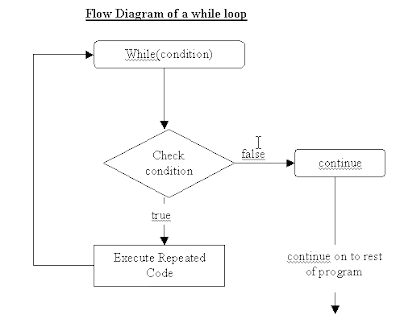
The expression provides an entry condition
The statement executes if the expression initially evaluates to true
The loop condition is then reevaluated
If it is still true, the statement executes again
The statement continues to execute until the expression is no longer true
An infinite loop continues to execute endlessly and can be avoided by making sure that the loop’s body contains statement(s) that assure that the exit condition will eventually be false
Examples:
int x=1; 
while (x <= 5)
{ cout<<x<<“\t”; x++;}

The output is:   1      2    3    4     5
  • Programming example:
#include <iostream>
using namespace std;
int main()
{
 int number; // variable to store the number
int sum = 0; // variable to store the sum
int count = 1; // variable to store the total number read
while(count <= 5)
 cout<<"enter integer: ";
cin>>number; sum = sum + number;
 count++;
}
count--;
cout<<"Line 7: The sum of "<<count<<" numbers is "<<sum<<endl;
 double average= static_cast<double> (sum) / count;
cout<<"average = "<<average<<endl;
return 0;
}
*Note: this statement  (static_cast<double> ) converts integer values to the identifier betwen < >.
i.e we have float variable and we want to convert it to int we type 
static_cast <int> (variable name)

The output of the past example is:
enter integer: 4
enter integer: 3
enter integer: 5
enter integer: 7
enter integer: 8
Line 7: The sum of 5 numbers is 27
average = 5.4

Sentinel-Controlled while Loops:
A sentinel variable is tested in the condition and the loop ends when the sentinel value is encountered
The syntax is:
cin>>variable;
while(variable != sentinel)
{
.
cin>> variable;
.
}
Flag-Controlled while Loops
A flag-controlled while loop uses a Boolean variable to control the loop.
It is suitable for searching Arrays.
The flag-controlled while loop takes the form:
found = false;
while(!found)
{
.
if(expression)
found = true;
.
}

C++ course (fourth section)

C++ course (fourth section)

fourth section(control structures)

One-Way (if) Selection

The syntax of one-way selection is:
if (expression)
statement1;
statement2;
If the value of the expression is true the statement1 is executed
If the value is false the statement1 is not executed and the computer goes on to the next statement in the program, which is statement2.
The expression is usually a logical expression
statement is any C++ statement
if is a reserved word

Two-Way (if…else) Selection


Two-way selection takes the form: 

if(expression) 
statement1;
else
statement2;
statement3;
If the value of the expression is true, statement1 is executed otherwise statement2 is executed 
statement1 and statement2 are any C++ statements 
else is a reserved word 
Statement3 is executed in any case


Compound Statement Example:
if(age > 18)
{
cout<<" Eligible to vote."<<endl;
cout<<" No longer a minor."<<endl;
}
else
{
cout<<"Not eligible to vote."<<endl;
cout<<"Still a minor."<<endl;
}


Nested if
When one control statement is within another, it is said to be nested 
An else is associated with the most recent if that has not been paired with an else

if (score > 100 || score < 0)
cout<<“Score is out of range”<<endl;
else if(score >= 90)
cout<<"The grade is A"<<endl;
else if(score >= 80)
cout<<"The grade is B+"<<endl;
else if(score >= 70)
cout<<"The grade is B"<<endl;
else if(score >= 60)
cout<<"The grade is C+"<<endl;
else if(score >= 50)
cout<<"The grade is C"<<endl;
else
cout<<"The grade is F"<<endl;


switch Structures
In a switch structure, the expression is evaluated first
Next, the value of the expression is used to perform the corresponding action
The expression is usually an identifier
It is sometimes called the selector
The expression value can be only integral
Its value determines which statement is selected for execution
A particular case value should appear only once
One or more statements may follow a case label 
Braces are not needed to turn multiple statements into a single compound statement 
The break statement may or may not appear after each statement 
The break statement has a special meaning and may or may not appear after each statement 
switch, case, break, and default are reserved words

When the value of the expression is matched against a case value, the statements execute until a break statement is found or the end of the switch structure is reached 
If the value of the expression does not match any of the case values, the statements following the default label execute. If there is no default label, and if the value of the expression does not match any of the case values, the entire switch statement is skipped 
A break statement causes an immediate exit from the switch structure.

switch (integer expression)
case value1: case value2:
statement; break;
case value3: case value4:
statement;
break;
.
.
.
default: statement;

C++ course (third section 2)

C++ course (third section 2)

third section(writing your first C++ program 2)

#include <iostream>      <------ this is the header     
using namespace std;     <------ location of header files
void main( )                      <------primary function
{                                   <------marks beginning of function body
cout << “This is C++!”;    <----statement that prints a string which is: This is C++!
}                                     <----- marks end of function body


Debugging
-Error in program called bug
-Process of looking for and correcting bugs
-Three types of errors:
   –Syntax
   –Run-time
   –Logic

1)Syntax Errors
Mistakes by violating “grammar” rules 
Diagnosed by C++ compiler 
Must fix before compiler will translate code


2)Run-Time Errors
Violation of rules during execution of program 
Computer displays message during execution and execution is terminated 
Error message may help locating error

3)Logic Errors
Computer does not recognize 
Difficult to find 
Execution is complete but output is incorrect 
Programmer checks for reasonable and correct output

C++ course (third section 1)

C++ course (third section 1)

C++ course
third section(write your first C++ program 1)

First you must know some main important things about the program:

Assignment Statement
•The assignment statement takes the form:
variable=expression 
•Expression is evaluated and its value is assigned to the variable on the left side 
•In C++, = is called the assignment operator

i.e int num1,num2;
double sale;
char first;
string str;
num1=4;
num2=4*3-7;
sale=0.02;
first='A';
str="have a nice day";
OR
int num1=3;
int num2=6;
double sale=2.5;
.
.
.
.
Input (Read) Statement
•cin is used with >> to gather input
cin>>variable>>variable;
•The stream extraction operator is >> 
•For example, if miles is a double variable 
cin >> miles;
−Causes computer to get a value of type double Places it in the variable miles

•Using more than one variable in cin allows more than one value to be read at a time
•For example, if feet and inches are variables of type int, a statement such as:
cin >> feet >> inches;
−Inputs two integers from the keyboard
−Places them in variables feet and inches respectively
Increment & Decrement Operators
•Increment operator: increment variable by 1
−Pre-increment: ++variable
−Post-increment: variable++
•Decrement operator: decrement variable by 1
−Pre-decrement: --variable
−Post-decrement: variable—
•What is the difference between the following?

1)
x = 5; 
y = ++x;


2)
x = 5; 
y = x++;

The first one you increment x by 1 (which become 6) then keep it and print it if you want,

The second one you keep the value of x which is 5 and print it if you want then you increment it by one.
Output(write) statement
•The syntax of cout and << is:
cout<<expression or manipulator<<expression;
−Called an output statement 
•The stream insertion operator is << 
•Expression evaluated and its value is printed at the current cursor position on the screen

•A manipulator is used to format the output
−Example: endl causes insertion point to move to beginning of next line
i.e cout<<x<<endl;
•The new line character is '\n' 
−May appear anywhere in the string 
cout << "Hello there.";
cout << "My name is James.";
•Output: 
Hello there.My name is James.


cout << "Hello there.\n";
cout << "My name is James.";
•Output : 
Hello there.
My name is James.

C++ Course (Second Section)

C++ Course
Second section (Knowing Some Important Concepts)

The Basics of a C++ Program:

•Function: A collection of statements; when executed, accomplishes something
−May be predefined or standard
•Syntax: Rules that specify which statements (instructions) are legal.
•Programming Language: A set of rules, symbols, and special words.
•Semantic Rule: The meaning of the instruction.
•Comments:
Comments are for the reader, not the compiler.
Two types:
−Single line
// This is a C++ program. It prints the sentence:
// Welcome to C++ Programming.
−Multiple line
/*
You can include comments that can occupy several lines. 
 */
•Special symbols :
+ - * / . ; ? , <= != == >=
Reserved Words (Keywords):
Reserved words, keywords, or word symbols
−Include:
•int
•float
•double
•char
•const
•void
•return

•Identifiers:
•Consists of letters, digits, and the underscore character (_).
•Must begin with a letter or underscore.
•C++ is case sensitive.
−NUMBER is not the same as number.
•Two predefined identifiers are cout and cin.
•Unlike reserved words, predefined identifiers may be redefined, but it is not a good idea.

Data Types:
1) Integers (int)
•Examples:
-6728
0
78
+763
 •Positive integers do not need a + sign
•No commas are used within an integer
−Commas are used for separating items in a list

2) Boolean (bool)
•bool type 
−Two Values: true and false 
−Manipulate Logical (Boolean) expressions 
•true and false are called logical values 
•bool, true, and false are reserved words 


3) Character (char)
•The smallest integral data type 
•Used for characters: letters, digits, and special symbols 
•Each character is enclosed in single quotes 
−'A', 'a', '0', '*', '+', ', '&' 
•A blank space is a character and is written ' ', with a space left between the single quotes


4) Floating-Point (float)
•C++ uses scientific notation to represent real numbers (floating-point notation)
Examples:
3.4
0.00023
-1.567
Types of float:
−Float: represents any real number 
•Range: -3.4E+38 to 3.4E+38 (four bytes) 
−Double: represents any real number 
•Range: -1.7E+308 to 1.7E+308 (eight bytes) 
−On most newer compilers, data types double and long double are same

•Maximum number of significant digits (decimal places) for float values is 6 or 7
•Maximum number of significant digits for double is 15
•Precision: maximum number of significant digits
−Float values are called single precision
−Double values are called double precision

5) String 
•Programmer-defined type supplied in ANSI/ISO Standard C++ library 
•Sequence of zero or more characters 
•Enclosed in double quotation marks 
•Null: a string with no characters 
•Each character has relative position in string 
−Position of first character is 0 
•Length of a string is number of characters in it 
−Example: length of "William Jacob" is 13

C++ Course (First Section)

C++ Course 
First Section: Introduction

Introduction to C++ Programming Language:


Welcome to my beginners guide to C++. If you are starting to program for the
first time, I hope that you find the sections I have written useful. C++ is an excellent
language to start programming in. A lot of applications that you use are probably
written in C++. Once you learn some basic concepts and other languages, like
Java or C# for example, programming will be much easier.
I have made the sections short and concise so you won’t get bored or weighed down by too much information. After each section you can rearrange the code in the examples provided or make up your own
code. Programming is very much a practical subject so you will learn a lot by messing with the code or even looking at other people’s codes.


What is a Computer Program?
A computer program is a set of instructions that a programmer writes to tell a
computer how to carry out a certain task. The instructions, however, must be in a
language that the computer understands. Computers only understand the binary language
i.e. that is composed of 1’s and 0’s. This is a low level language and very hard to
program in. So humans invented higher level languages, such as, C++ and Pascal to
make the job easier. As you will see, these languages are nearly like English, but you
don’t have the freedom to write what you like there still are rules you have to
follow.
To convert a program in C++ to a binary or executable file that the computer can
understand we use a compiler.

Monday, 23 September 2013

CCNA (fifth lecture)

Fifth Lecture 

IP addressing:
what is an ip address ?
An Internet Protocol address (IP address) is a numerical label assigned to each device (e.g., computer, printer) participating in a computer network that uses the Internet Protocol for communication.
it consists of 4 digits separated by dot "." each digit has 8 bits , e.g: 192.168.10.1
It is classified into 5 classes:


e.g: Class A: 192.0.0.0
Class B: 192.168.0.0
Class C:192.168.10.0

Class A we can put a lot of devices and it has the largest amount among classes,
Class B contains less, and class C contains the least.

=======================================================

DNS & DHCP
DNS (Domain Name service)
An internet service that translates domain names into IP addresses and visa verse.

Ex: google IP: 173.194.41.70

DHCP(Dynamic Host Configuration Protocol)
is a network protocol used to assign IP addresses and provide configuration information to devices such as servers, desktops, or mobile devices, so they can communicate on a network using the Internet Protocol (IP).


biz.